 |
VR-Forces 4.2 Class Documentation
|
|
VR-Forces 4.2 Class Documentation
|
The Object Manager needs to create an instance of DtVrfObject for each simulated object.
It does so as follows:
The Object Manager ticks all of its objects (local and remote) in its tick() function.
This section expands on step 2 in the previous section. When the Object Manager creates an instance of a DtVrfObject, it needs to configure it with different subcomponents, depending on whether or not the object is local or remote. The Object Manager knows which subcomponents to use because the object parameter database entry for each object specifies two lists of subcomponents, one for local objects; the other for remote objects. The strings in the subcomponent list correspond to the C++ objects that make up a DtVrfObject (through a has-a relationship).
When the Object Manager creates a new object, it looks up the entry in the object parameter database for the object type to be created. The Object Manager passes the object’s local or remote status into the DtVrfObject constructor. When the new object gets initialized by the Object Manager, it:
For example, if the object is a local object and the state-repository component lists the string ground-entity-state-repository, the Object Manager knows that it has to create a DtGroundVehicleStateRepository for this object. The figure illustrates this process using the subcomponent list for a ground vehicle.
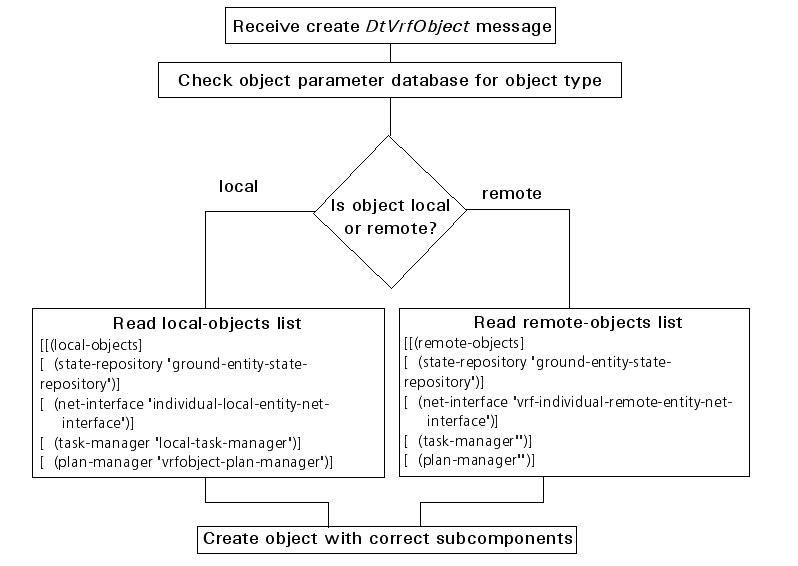
The following list matches the subcomponent strings to their base class. To find the subclasses for the various subcomponents, please see the class documentation for the base class and navigate to the subclass that you are interested in. Each subclass has a type() member function that returns the type string for the component. The type is registered with the appropriate factory and is what gets specified in the object parameter database.
At any given time, the Object Manager may maintain a mix of local and remote objects.
A DtVrfObject can be uniquely identified through one of the following:
You can look up objects in the Object Manager by object ID (site:application_number:object_number), echelon ID, or name. Object names must be unique. The name of an object simulated by an application other than VR-Forces is its marking text.
The object type (DtObjectType, in objType.h) is an extension of the VR-Link DtEntityType class. It adds an enumerated field to the DIS/RPR FOM entity type enumeration. The new field indicates the general type of object, for example, individual or aggregate. The remaining fields (kind, domain, country, category, subcategory, specific, and extra) are unchanged. For example, the entity type enumeration for an M1A2 tank is 1 1 225 1 1 3 -1. The VR-Forces object type is 1 (1 1 225 1 1 3 -1).
The object type is used to:
The DtObjectType class has static predefined object types. These types can provide a convenient short-hand for specifying various kinds of objects. The predefined static types are:
The VR-Forces extensions to the standard DIS/RPR FOM entity type enumerations are specified in objTypeEnums.h.
All simulated objects have an object name, a unique string used to identify the object within the exercise. Object names are implemented using the DtString (rwString.h) class. An object name must be unique across all VR-Forces applications participating in an exercise. An object’s name persists not only for the lifetime of the simulation, but from session to session. (It is saved as part of the object’s data in the order of battle file.) All references to control objects or entities in entity plans are made using object names.
You may have the DtVrfObjectManager suggest a unique name to assign to the object, or you may choose one yourself. Call DtVrfObjectManager::nextName() to have VR-Forces generate a name for a DtObjectType and DtForceType. It is up to the user to ensure that the name is unique.
Objects can have arbitrary names; however, the names have restrictions on their length, because they are transmitted over the network in the marking text field. The following table lists the limits on object name length.
| Object Name Length Restrictions | |||
|---|---|---|---|
| Protocol | Individual Entity | Aggregate | Control Object |
| DIS | 11 | 32 | 255 |
| HLA RPR FOM | 11 | 10 | 255 |
Entities that belong to a hierarchical organization have an echelon ID, a unique string that reflects their position in the hierarchy (for example, 1 M1A2, 2 Plt, 1 Force). Please see 4.5 - The Organization Manager, for more information about echelon IDs.
A label is a text string that can persist beyond a particular run of an exercise (unlike an object ID, which can change between sessions if the site:application_number changes.) It does not have to be unique. It would typically be something that makes sense to a human exercise participant, such as labeling a waypoint "Waypoint Alpha".
[<< The Object Manager and Simulated Objects] [Home] [Top of Page] [State Repositories >>]