 |
VR-Forces 4.2 Class Documentation
|
|
VR-Forces 4.2 Class Documentation
|
All DtVrfObjects have a state repository data member that contains all the state information for the object.
State repositories are essentially container classes for state information. If the object is locally simulated, this is the information that is being generated by the simulation. If an object is a remote object, this is information that has been copied (and converted, as necessary) from the object’s remote network interface. The repository holds, among other things, an object’s position, velocity, acceleration, and orientation in local (database) coordinates, and an indication of whether or not the object is destroyed.
The state repository (DtVrfObjectStateRepository, in vrfObjSR.h) contains most of the information found in the network interface, but in a form more suitable for use within a simulation. For example, locations and velocities are kept in local (database) coordinates (as contrasted to geocentric coordinates, which are used in network messages.)
All state repositories have at least the following member data:
There are several derived state repository classes that contain state information specific to a particular category of objects. For example, the fixed-wing state repository class, DtFixedWingStateRepository, maintains information specific to fixed-wing entities, like maximum angle of attack and minimum altitude.
The state repository is a readable, writeable member of a DtVrfObject and, therefore, is saved and restored as part of an object’s data in the order of battle file.
Whenever you save or checkpoint a scenario, VR-Forces saves the state of all locally simulated entities to the order of battle file. This state includes items such as kinematic state (position, velocity, orientation, and so on), damage status, and resource levels. VR-Forces also saves information about the processes the entity was carrying out at the time of the save, such as the name of a waypoint it was heading toward, or the identity of the current target in a weapon system.
Each Object Manager maintains an object parameter database. The object parameter database is a set of text files that store parameter and component data for each type of object that VR-Forces can simulate. When you load a scenario, the Object Manager reads and stores the object parameter database. When an object is created, the Object Manager looks up the object type in the object parameter database and reads the components and parameter values specified for it. It creates the object using those components and parameters.
The contents of the object parameter database file and the meaning of each parameter are discussed in VR-Forces Configuration Guide. VR-Forces has an API that you can use to create object parameter databases in file formats of your own choosing. For details, please see 3.8 - The Object Parameter Database API.
All objects are associated with a parameters object, a DtVrfObjectParameters (vrfObjParams.h) or derived class. Object parameters hold all of the information needed to construct a DtVrfObject with the proper type of subcomponents. The object parameter database is consulted when an entity is created. The parameters are looked up, then a copy of those parameters is kept with the object.
DtVrfObjects have two object parameters members. One is a pointer to the object parameter database entry the object is created with, and one is its own copy that it creates. The local copy is initialized with values from the object parameter database entry.
To access an object’s object parameter database entry, do the following:
To access an object’s local parameter copy, do the following:
For more information about parameters, please see 4.6.1 Entity Parameters.
The object parameter database lists the component strings associated with each object type. When the Object Manager creates an object, it reads the entry for that object in the object parameter database. (For details about the Object Manager, please see 3.1 - The Object Manager and Simulated Objects.) It uses the appropriate string in the creator function and the object factory does the rest.
For example, the following code is the beginning of the actuators entry for a generic ground vehicle in the object parameter database. It tells the Object Manager that the component type for the powertrain is an automotive-actuator. The Object Manager looks up the string automotive-actuator in the factory and determines that it has to create a DtAutomotiveActuator for the ground vehicle.
For more information about factories, please see 2.4.1 VR-Forces Factories. Also, please see the addActuator example in 6 - Creating Actuators and Controllers.
A state repository has an object geometry member, DtVrfObjectGeometry (vrfObjGeom.h) (derived from DtSimObjectGeometry), which contains any bounding geometry and actual model geometry, or both, available for a simulation object. The object geometry represents the extent in space of a given simulated object. It maintains a rectangular bounding volume and an ordered list of vertices describing the physical extent of the object. Control objects may have one or more vertices representing the object. Individual entities are represented by a single vertex and a rectangular bounding volume. The file kinTools.h contains utility functions for determining such things as the elevation angle to a given point, distance between points, and whether or not a given point lies inside the bounding volume.
Objects such as platform entities usually do not provide any model data, but are described by a rectangular bounding volume. For an area control object or a route, the vertices of the object are provided. (For details, please see DtSimBoundingGeometry.) The list of vertices may either be closed (as in an area), or open (as in a route). The vertices may also be projected (as in a phase line). If the vertices are projected, then in topocentric coordinates, any computations performed on the vertices ignore the Z component. If you know that your object has projected coordinates, then setting the object geometry projected flag (DtVrfObjectGeometry::setProjection(true)) enables some of the geometry functions to be optimized for 2-D.
Object geometry provides an interface for working in either local (database) coordinates or world coordinates. It is initialized for an object from its object parameter database entry. For example, to iterate over the vertices in an object, do the following:
VR-Forces includes convenience functions associated with object geometry that can be useful when performing modeling, such as collision avoidance and targeting. Please see kinTools.h.
DtVrfKinematicState (vrfKinState.h) encapsulates the kinematic state of an object with respect to the local (database) and network (geocentric) coordinate systems, as well as with respect to its own parent object, for attached objects such as launchers or turrets. Through an object’s kinematic state you can query or update an object’s position, velocity, acceleration, and orientation. Conversions between the various coordinate systems are handled transparently within the kinematic state object. You can work with whatever coordinate system is most convenient, without needing to write any code to handle conversion.
For example, you can ask for an object’s position in the following ways:
In the case of parentLocation(), if the object is not attached to another object, the object is considered "attached" to the database. (For details about attachment relationships, please see 3.3.5 The Attachment Manager.) Its parent location is equivalent to its database location. In the case of a turret attached to a tank, however, the parent location for the turret would be given in the body coordinate system of the tank.
The Attachment Manager (DtVrfAttachmentManager, in vrfAttachMgr.h) maintains a tree of physically attached sub-parts for the state repository class. The sub-parts may represent items such as a gun or turret attached to a tank, or they may represent entire objects, such as a tank mounted on an LCAC. These parts are represented as other DtVrfObjectStateRepositories. Parts that need to maintain geometry with respect to some parent geometry use this manager. Since some parts may be DtVrfObjects in their own right, a reference state repository class (refSR.h) is used to represent these parts. Creation of the part state repositories is done outside the Attachment Manager; parts are attached and detached as required. Once a part has been attached with the attachPart() call, the DtVrfAttachmentManager assumes responsibility for deleting the memory associated with the part. Creation of articulated and attached parts normally occurs when an object’s state repository is being initialized with data from its parameter entry. The parameter entry contains the list of articulated part types, attached part types (if any exist), or both.
The Attachment Manager provides iterators to traverse either the top level state repositories it maintains or the entire forest it represents.
The DtObjectType (objType.h) object (which is an extension of the DIS enumerated type) is used to describe the part type. This entity type has a Kind of DtSimArtPartKind, with a category that matches the DtArtPartType used to represent the part on the network. Parts not described by reference state repositories are expected to have unique part types (nothing will break if they do not, findPartByType() finds the first part that matches). For articulated parts, the DIS standard provides different articulated part type values for parts of the same logical type (for example, two turrets could have part types DtPrimaryTurret1 and DtPrimaryTurret2) so this unique part type restriction should be easy to maintain.
For example, to look up the main gun on a tank, do the following:
For attached objects, it may often be the case that the entity types are not unique. For this reason, findPartByType() ignores reference repositories when searching the elements contained in the Attachment Manager.
To attach and detach parts (state repositories) use the state repository’s attachToParent() and detachFromParent() member functions. These functions invoke the Attachment Manager’s attachPart() and detachPart() member functions, respectively.
Objects such as aggregate entities, may contain a collection of other objects. The DtVrfSubordinateManager (vrfSubordMgr.h) defines an interface for maintaining a collection of these subordinate objects. Subordinates differ from attachments in that they imply an organizational relationship, as opposed to a physical relationship. The Subordinate Manager provides an interface for adding, removing, and iterating through a list of subordinate objects. For example, to examine the list of subordinates belonging to an object, do the following:
For more information, please see 4.5 - The Organization Manager.
As noted in "SimulatedObjects, the differences between simulated objects are expressed in the state repository class hierarchy. The differences between a tank, a helicopter, or a route are largely a function of the kind of state repository each has. Control objects use a DtVrfObjectStateRepository. Entities use DtMovingObjectStateRepository or one of its derived classes. The figure illustrates the hierarchy of derived state repositories for simulating different kinds of objects.
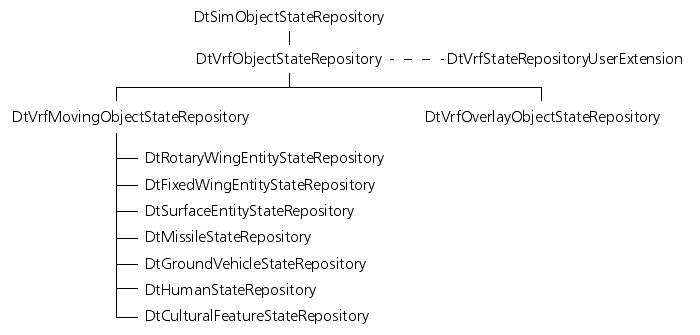
The DtVrfObjectStateRepository (vrfObjSR.h) holds information that is common to all simulated entities within VR-Forces. It is an intermediate state repository that has a role similar to an abstract base class for entity state repositories. It is not created for any entities in VR-Forces. However, all other state repositories in VR-Forces inherit this class.
The DtVrfObjectStateRepository maintains the independently tasked and request task needed state for an entity. These members are typically accessed through the DtTaskManager class (users should not normally need to access them directly). They exist as readable and writeable members of the DtVrfObjectStateRepository so they get saved and restored as part of an entity's state in the order of battle file. Similarly, the
DtVrfObjectStateRepository maintains a readable and writeable list of current tasks an entity is working on. This data is manipulated by the DtTaskControllerComponents configured on an entity (users should not typically have to access it directly). This data is also saved as part of an entity's state in the order of battle file. This enables entities to remember what task they were working on at the time the scenario was saved (whether assigned from a plan or from the GUI as an independent task).
DtVrfMovingObjectStateRepository (vrfMvObjSR.h) is derived from DtVrfObjectStateRepository. It holds information that is common to all VR-Forces objects that can move. It is the base class for all of the individual entity state repositories. It is also the state repository used for aggregate entities. It provides storage, accessors, and mutators for the following data:
You can extend the base state repository class DtVrfObjectStateRepository, as an alternative to, or in addition to extending leaf-level classes in the DtVrfObjectStateRepository hierarchy. The base state repository class, DtVrfObjectStateRepository has-a DtVrfStateRepositoryUserExtension (vrfSRUserExt.h) that you can extend for all types of entities and objects (vrfstaterephierarchyfigure State Repository Hierarchy).
For example, suppose you want to extend all types of entities and objects in VR-Forces (fixed-wing, rotary-wing, ground, and so on) with a new kind of identifier. Rather than extending each type of state repository to include the new identifier, you just need to create a single derived kind of DtVrfStateRepositoryUserExtension class. This allows you to write the extension once, and configure it as part of a variety of different kinds of entities, control objects, or overlay objects. The alternative to this approach would be to subclass each kind of state repository separately, extending each class in exactly the same way.
Like the DtVrfObjectStateRepository classes, classes derived from DtVrfStateRepositoryUserExtension are readable and writeable. Any DtReaderWriter data members you add to your derived DtVrfStateRepositoryUserExtension will be saved to an order of battle file along with the rest of an object’s DtVrfObjectStateRepository data.
The example project extendStateRepository demonstrates how to extend state repositories at the base class level.
[<< How the Object Manager Creates an Object] [Home] [Top of Page] [The Network Interface >>]