
VR-Forces 5.0.1 Developer's Guide
 All Classes Namespaces Files Functions Variables Typedefs Enumerations Enumerator Properties Friends Macros Groups Pages
exampleCommLines

Table of Contents

Overview

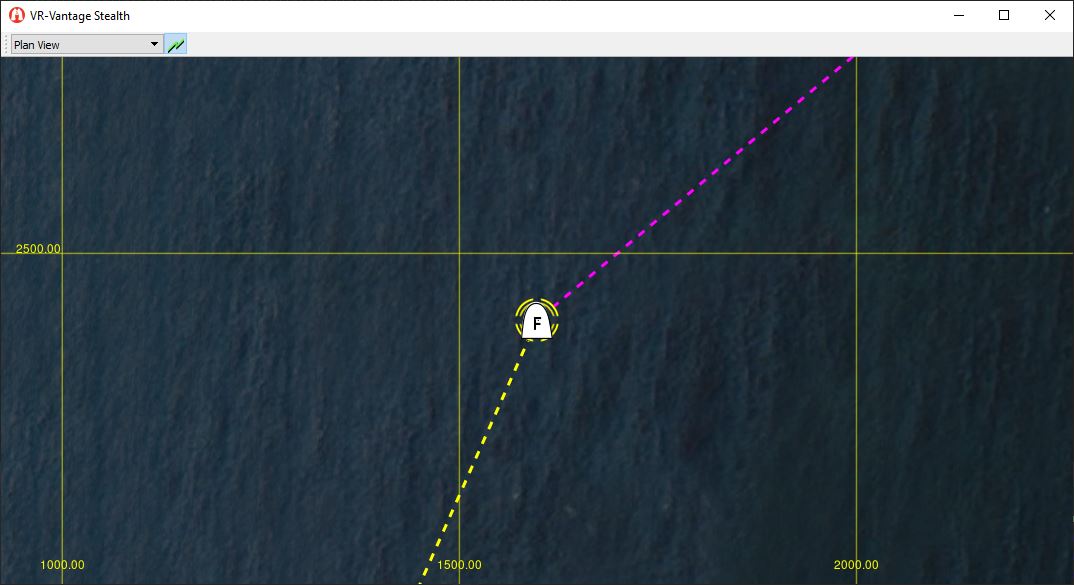
This example demonstrates how to manually create communication lines in a scene. During normal VR-Vantage execution, the communication and transmission element processors listen for interactions and messages on the network that indicate communications. Should communication lines need to be created to visualize communications that are either not published on the network or are different types of communications, communication lines can be manually created in the manner demonstrated in this example.

Expected Result

exampleCommLines.png
Communication lines in 3D
exampleCommLinesPVD.png
Communication lines in 2D

Example details

There are two different types of communication lines in VR-Vantage. The first is a line connecting the two communicating entities, and the second is a set of circular lines that radiate from the source of the communication.

The first type, dubbed 'Communication Lines' connect the sender and receiver of the communication. The end points of the line may be attached to either entities (either moving or stationary), or fixed points in space. The lines are also dashed, and scroll in the direction of the communication (from sender to receiver). The rate at which the lines scroll can be configured in the Interaction Definition Editor in the configured DtRadioCommunicationVisualizer's visual definition. Communication Lines can also be configured to be displayed as straight lines (Line-Of-Sight mode), or as curved lines that follow the surface of the earth (Curved-Earth mode) - the comm line display mode can be configured on the Radio Communications page in the Display Settings Dialog.

The second type of communication lines are called 'Squawk Lines,' and radiate outwards from the source of a radio communication so the source can be easily identified at a glance. As with Communication Lines, Squawk Lines can be attached to either an entity or a fixed point in space, and the animation rate can also be configured in the same manner as the Communication Lines' animation rate.

In addition to the above mentioned settings, there are also other settings that can be configured through the Display Settings dialog. These other settings include the duration for which the different types of communication lines remain visible after the initial communication (their 'lifetime'), and options for coloring communications based on their frequency.

Communication Line Creation and Management

All communication lines are created and managed through the DtCommunicationsLineManager. Having a single class manage and maintain all communication lines ensures that multiple DtCommunicationLine or DtSquawkLine objects aren't created between the same two entities or at the same point in space. It is also the DtCommunicationsLineManager that keeps track of the creation time of all the communication lines and handles their animation as well as their destruction when the end of their lifetimes are reached. The coloring of the communication lines based on frequency is also handled by the DtCommunicationLineManager.

The DtCommunicationsLineManager exists in VR-Vantage's main thread, and as such cannot be controlled directly from threads other than the main thread. The DtCommLineManagerCommunicatorAgent exists to allow communication with the DtCommunicationLineManager from other threads, and provides much the same interface as the DtCommunicationLineManager itself. In short, when creating or managing a communication or squawk line from the main thread - use the Manager, when creating or managing a communication or squawk line from any other thread - use the Communicator.

The Example

This example shows how to manually create communication lines in VR-Vantage. The example provides an environment for the communication lines (Ground_DB II), and an entity (F-18) for demonstrating attaching communication lines to a moving entity. For more information regarding the setup of the environment and entity, see the exampleDriver example.

The driver's onTick() method is where the communication line logic resides. Every time the driver ticks, it checks when the last time communication lines were created was, and waits until 15 seconds have passed to create new communication lines and squawk lines. Upon creating the communication lines, the driver sets the lifetime for the communication and squawk lines to 10 seconds, overriding the global lifetime setting and ensuring the lines will time out before new lines are created. If the driver didn't wait until the lines were timed out, the re-creation of the comm lines would only extend the lifetime of the existing lines another 10 seconds, and the lines would never time out.

The example provides code demonstrating both how to use the DtCommunicationLineManager directly, as well as how to use the DtCommLineManagerCommunicatorAgent. When using the DtCommunicationLineManager directly, a find call is necessary for each communication line and squawk line action, and the returned comm line ID must be used to modify it.

When using the DtCommLineManagerCommunicatorAgent, the communicator itself keeps track of the ID of the last communication line found and automatically uses that ID for further set calls.

Building the Example

VR-Vantage includes pre-built versions of the example plug-in. To build it yourself, follow the instructions at Building VR-Vantage Examples, Applications, and Plug-ins.

Running the Example

This example is a plug-in. You can run it by running vrvStealth.exe –plugin ../examples/plugins/release/exampleCommLines.dll (on Windows) or vrvStealth.exe –plugin ../examples/plugins/release/libexampleCommLines.so (on Linux) from the command prompt. Once Vantage is started, press the "s" multiple time to move away from the "F18" and see the comminication lines. From the toolbar menu toogle to "plan view" to see the communication line in 2D. For more information about running examples, please see Running Applications and Examples.

exampleCommLines.cxx


exampleCommLines.cxx

/*****************************************************************************
* Copyright (c) 2019 MAK Technologies, Inc.
* All rights reserved.
*****************************************************************************/
#include <vrvCore/DtDe.h>
#include <QtCore/QObject>
#include <QtCore/QString>
#include <QtWidgets/QToolBar>
// Use the VR-Vantage namespace.
// All classes in VR-Vantage are in this namespace.
using namespace makVrv;
class DtExampleCommLinesToolbar : public DtToolbar
{
public:
DtExampleCommLinesToolbar( DtDe& de )
: DtToolbar( de, "DtExampleCommLinesToolbar" )
{
}
virtual ~DtExampleCommLinesToolbar() {}
virtual QToolBar* createToolbar( DtDe& de, QWidget* parent )
{
QString title = QObject::tr("Comm Lines Example Toolbar");
QToolBar* tb = new QToolBar( parent );
tb->setWindowTitle( title );
tb->setObjectName( title );
return tb;
}
};
void initializeMinimalUI( DtDeInitializer&, DtDe&,
{
// Create DtExampleDriver.
// The driver is now owned by the display engine. Do not delete it.
de.driverManager().addDriver(driver);
// Start the driver, creating the agent.
de.driverManager().startDriver(driver);
}
void init(DtDe& de)
{
// Ensure that init only gets called once
// (not strictly necessary here, but this is good practice in general)
// We only want to create the driver if we are running in master mode.
if (de.isInMasterMode())
{
if (app)
{
DtVrvApplication::ApplicationTransform functor = boost::bind(&initializeMinimalUI, _1, _2, _3);
app->installPostPluginTransform(functor, "MinimalUIPostPluginTransform");
}
// The accessory must be created after the DE's initialization is
// finished, to make sure all the objects it uses exist.
&installDriver, boost::ref(de)));
}
}
{
// Setup the plug-in. Normally, the init function and functionality
// should be in its own library.
init(*de);
return true;
}
void initializeMinimalUI( DtDeInitializer& deInit, DtDe& de,
{
// Register the toolbar so it can be added to the gui.
new DtExampleCommLinesToolbar(de) );
// Register the toolbar menuitem so it can be added to the toolbar.
// Add the example's toolbar with the observer mode widget and comm lines toggle button.
toolbar.addToolbarPath( DtToolbarPath::toolbar("DtExampleCommLinesToolbar") );
toolbar.addToolbarPath( DtToolbarPath::toolbar("DtExampleCommLinesToolbar").widget("DtObserverModeSelectionWidget") );
toolbar.addToolbarPath( DtToolbarPath::toolbar("DtExampleCommLinesToolbar").item("DtRadioCommunicationsMenuItem") );
// Tell the De not to show the startup screen. This must be done here
// because it will be overwritten if set with the rest of the configs.
}

DtExampleCommLinesDriver.cxx

/*****************************************************************************
* Copyright (c) 2022 MAK Technologies, Inc.
* All rights reserved.
*****************************************************************************/
#include <vrvCore/DtRadioCommsVisualizationManagerCommunicatorAgent.hpp>
#include <vrvCore/DtSceneObjectAgent.hpp>
#include <vrvCore/DtDe.h>
// Use the VR-Vantage namespace.
// All classes in VR-Vantage are in this namespace.
using namespace makVrv;
: makVrv::DtDriver( am, "DtExampleCommLinesDriver" )
, myEntityFacade( 0 )
, myAngularVelocity( 0.2 )
, myOrbitCenter( 0.0, 0.0, 800.0 )
, myLastCommLineTime( 0.0 )
, myLastUpdateTime( 0.0 )
, myClockAngle( 0.0 )
, myRadius( 1000.0 )
, myRoll( 0.5 )
, myCoordinateSystem( nullptr )
{
// Going forward we recommend locally cloning and keeping the coordinate system in sync
// with signals for ensuring thread safe operations on client side
myCoordinateSystem = am.de().sharedState().coordinateSystem().clone();
if (myCoordinateSystem == nullptr)
{
DtTHROW_NEW(DtCorruptedState, "myDe.sharedState().coordinateSystem().clone() failed.");
}
myConnections += DtDeSharedStateSignaler::instance( am.de() ).signal_coordinateSystemChanged.connect(
slot_coordinateSystemChanged();
}
{
}
const std::string& DtExampleCommLinesDriver::className() const
{
static std::string name = "DtExampleCommLinesDriver";
return name;
}
{
// Load Ground_DB II programatically.
DtScene& sceneDriver = myAgentManager.de().scene();
std::string groundDbPath = myAgentManager.de().dePathConfiguration().sharedDataPath();
groundDbPath += "/TerrainData/TerrainConfiguration/Ground_DB II.mtf";
sceneDriver.loadTerrain( groundDbPath );
// Create an element that represents the entity.
DtElementID parentElementId = 0;
std::string entityDisplayName = "F-18";
reportElementCreated( elementId, parentElementId, DtElementEntry::Entity );
reportElementAttribute( elementId, new DtElementAttributeDisplayName(entityDisplayName) );
// Instantiate the entity facade.
myEntityFacade = createEntityFacade( myAgentManager, elementId, setsToRealize, true );
// Initialize the F-18's position.
// Attach to entity.
std::vector<DtElementID> objects;
objects.push_back( myEntityFacade->elementId() );
inputDriver.currentObserver()->setPrimaryAttachment( objects );
return true;
}
{
{
myEntityFacade = 0;
}
// apply changes before stopping completely
{
}
return true;
}
{
// Update the comm lines for each model set (if interval has elapsed).
double now = myAgentManager.de().simulationTime();
if ( now - myLastCommLineTime > 15 )
{
// Iterate over realized model sets and update the comm lines.
DtModelSetRealizationManager::ModelSetRealizations::const_iterator i;
DtModelSetRealizationManager::ModelSetRealizations::const_iterator e;
i = setsToRealize.begin();
e = setsToRealize.end();
for ( ; i != e; ++i )
{
if ( i->second )
{
updateCommLines( i->first );
}
}
}
return true;
}
{
stop();
start();
}
const DtModelSetRealizationManager::ModelSetRealizations& modelSets, bool distribute )
{
DtEntityFacade* facade = new DtEntityFacade( am,
DtSharedSettingsManager::instance( am.de() ), elementId, modelSets,
distribute );
// Initialize the 3D facade.
DtEntity3dFacade* facade3d = facade->findFacadeFor3d();
if ( facade3d )
{
int modelSet = facade3d->modelSet();
facade3d->setArticulatedModelDefinition("FixedWingFA-18Hornet");
mySceneObjectIds[modelSet] = facade3d->sceneObjectAgent().uniqueId();
}
// Initialize the 2D facade.
DtEntity2dFacade* facade2d = facade->findFacadeFor2d();
if ( facade2d )
{
int modelSet = facade2d->modelSet();
facade2d->setIconModelDefinition("2525bIcons");
facade2d->setFillGlyph( DtUnicodeChar((wchar_t)0x0022) );
facade2d->setDamageGlyph( DtUnicodeChar((wchar_t)0x0061) );
facade2d->setOutlineGlyph( DtUnicodeChar((wchar_t)0x40C6) );
mySceneObjectIds[modelSet] = facade2d->sceneObjectAgent().uniqueId();
}
// Initialize the Colorized facade.
DtEntity3dFacade* facadeColorized = facade->findFacadeForColorized();
if ( facadeColorized )
{
int modelSet = facadeColorized->modelSet();
facadeColorized->setModelScalingEnabled( true );
facadeColorized->setArticulatedModelDefinition("FixedWingAttackNotional");
mySceneObjectIds[modelSet] = facadeColorized->sceneObjectAgent().uniqueId();
}
return facade;
}
{
// Get current time and compute time since last update.
double now = myAgentManager.de().simulationTime();
double dt = now - myLastUpdateTime;
// Update clock angle. The clock angle represents the bearing
// to the aircraft from the center point of its orbit.
// Compute heading / offset using clock angle.
// By making some assumptions about the direction (clockwise) of the
// aircraft's orbit and the fact that it is perfectly circular, its heading
// can be computed using only the current clock angle.
double heading = myClockAngle + M_PI_2;
// Compute orientation based on heading/roll.
DtTaitBryan ori( heading, 0, myRoll );
// Update the aircraft's position/orientation with the new parameters.
// Store as last update time.
myLastUpdateTime = now;
}
{
// Database coordinates for the house and the tower.
DtVector houseRadio( -185.0, -600.0, 24.0 );
DtVector towerRadio( -105.0, 515.0, 94.0 );
DtUniqueID sceneObjId = mySceneObjectIds[modelSet];
// The DtRadioCommsVisualizationManager handles the creation, animation, and
// timeout of all communication lines. The code below creates comm lines
// between the airfield tower, the plane, and a house on the wester shore.
// If you are operating in a separate thread, you will need to use the
// DtRadioCommsVisualizationManagerCommunicatorAgent to interact with the
// DtRadioCommsVisualizationManager.
#if 1
// This block creates the comm and squawk lines/indicators by directly telling
// the manager what to do. This method can only be used when in the main thread.
// The lifetimes of the are set manually here (so the comm lines and squawk
// indicators time out before they are recreated, however if the
// setLifetime(..) call is left out, the manager will use the master comm line and
// squawk indicator lifetimes specified in the settings.
DtRadioCommsVisualizationManager::instance( myAgentManager.de() );
// Create a comm line between tower and plane.
manager.findOrCreateAndSelectCommLine( modelSet, 0, towerRadio, sceneObjId );
manager.setColor( 1, 0, 1 );
manager.setLifetime( 10 );
manager.setStipplePattern(0xFF00);
// Create a squawk indicator at the tower.
manager.findOrCreateAndSelectSquawkIndicator( modelSet, 0, towerRadio );
manager.setColor( 1, 0, 1 );
manager.setLifetime( 10 );
// Create a comm line between plane and house.
manager.findOrCreateAndSelectCommLine( modelSet, 0, sceneObjId, houseRadio );
manager.setColor( 1, 1, 0 );
manager.setLifetime( 10 );
manager.setStipplePattern(0xFF00);
// Create a squawk indicator at the plane.
manager.findOrCreateAndSelectSquawkIndicator( modelSet, 0, sceneObjId );
manager.setColor( 1, 1, 0 );
manager.setLifetime( 10 );
#else
// This block performs the same operations as above, but uses the
// DtRadioCommsVisualizationManagerCommunicatorAgent to tell the DtRadioCommsVisualizationManager
// what to do. Note that the communicator manages the id of the last found
// comm/squawk line/indicator for you. This method of communicating with the
// DtRadioCommsVisualizationManager will need to be used if your code is being
// executed from a different thread (as is the case for visualizers).
DtRadioCommsVisualizationManagerCommunicatorAgent* communicator =
DtRadioCommsVisualizationManagerCommunicatorAgent::create( myAgentManager, false );
// Create a comm line between tower and plane.
communicator->findCommLine( modelSet, 0, towerRadio, sceneObjId );
communicator->setColor( 1, 0, 1 );
communicator->setLifetime( 10 );
communicator->setStipplePattern(0xFF00);
// Create a squawk indicator at the tower.
communicator->findSquawkIndicator( modelSet, 0, towerRadio );
communicator->setColor( 1, 0, 1 );
communicator->setLifetime( 10 );
// Create a comm line between plane and house.
communicator->findCommLine( modelSet, 0, sceneObjId, houseRadio );
communicator->setColor( 1, 1, 0 );
communicator->setLifetime( 10 );
communicator->setStipplePattern(0xFF00);
// Create a squawk indicator at the plane.
communicator->findSquawkIndicator( modelSet, 0, sceneObjId );
communicator->setColor( 1, 1, 0 );
communicator->setLifetime( 10 );
// The communicator should be deleted when all operations are complete.
delete communicator;
communicator = 0;
#endif
}
void DtExampleCommLinesDriver::repositionAircraft( DtVector position, DtTaitBryan ori )
{
// Get the coordinate converter and initialize.
DtCoordinateConverter* coordConverter;
coordConverter = myCoordinateSystem->converter();
coordConverter->setupTopoFrame( position );
// Convert the position (from ENU) to local database (CIG) coords.
DtVector finalPosition;
coordConverter->enuToCig_coordTrans( position, finalPosition );
// Convert the orientation (from NED) to local database (CIG) ori.
DtTaitBryan finalOrientation;
finalOrientation = coordConverter->nedToCig_EulerTrans( ori );
// Set the Position and Orientation on the aircraft.
myEntityFacade->setOrientation( finalOrientation );
myEntityFacade->setPosition( finalPosition );
}
{
}

DtExampleCommLinesDriver.h

/*****************************************************************************
* Copyright (c) 2022 MAK Technologies, Inc.
* All rights reserved.
*****************************************************************************/
#pragma once
#include <boost/unordered_map.hpp>
#include <matrix/vlTaitBryan.h>
#include <matrix/vlVector.h>
namespace makVrv
{
class DtEntityFacade;
class DtCoordinateSystem;
}
{
public:
virtual const std::string& className() const;
virtual bool onStart();
virtual bool onStop();
virtual bool onTick();
virtual void slot_displayEngineAdded( const makVrv::DtDeRecord& igRecord );
protected:
virtual void updatePosition();
virtual void updateCommLines( int modelSet );
virtual void repositionAircraft( DtVector position, DtTaitBryan ori );
protected:
typedef boost::unordered_map<int,makVrv::DtUniqueID> SceneObjectIdsByModelSet;
double myClockAngle;
double myRadius;
double myRoll;
};

[<< Examples] [Home] [Top of Page]


Document ID: Generated on Mon Jun 20 00:38:30 EDT 2022 from SVN revision 244029
Copyright © 2005-2021 MAK Technologies. All Rights Reserved (www.mak.com)